 Teslita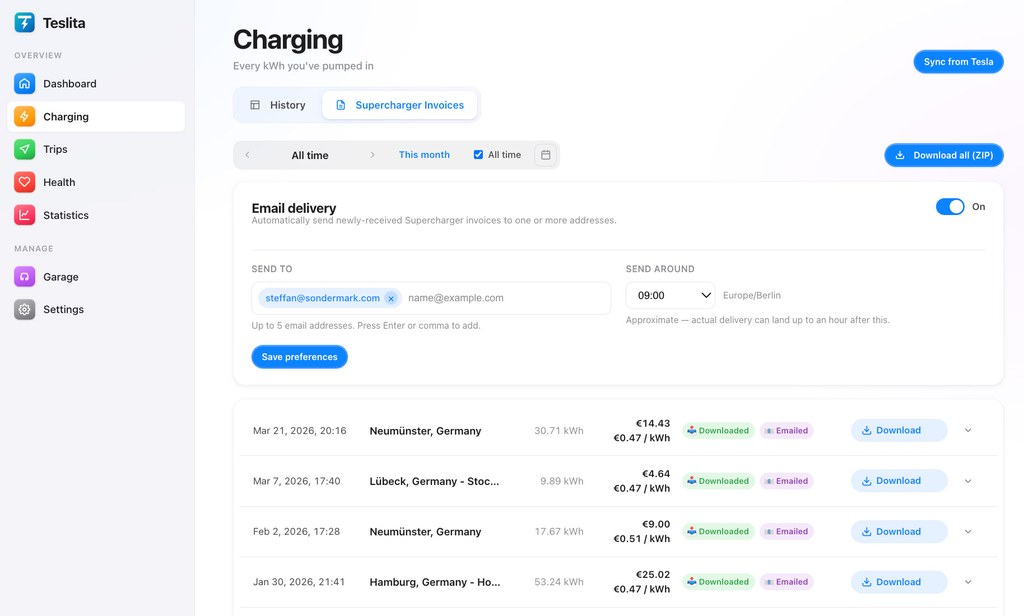
The headline feature: automatic email delivery
5 featuresIf you only use Teslita for one thing, this is the one. Flip a single toggle and every Supercharger invoice Tesla ever issues for your car is forwarded — to you, your accountant, and up to three others — the day it's issued, around the hour you choose. You will never log into a Tesla account to chase a charging receipt again.
One toggle, then it's automatic Auto
Open Charging → Supercharger Invoices, flip the "Email delivery" switch on, save. From that moment, every new invoice Tesla posts for your car is emailed out automatically the same day. No further action, ever — not after a software update, not when you swap accountants, not when you go on holiday.
Up to five recipients in one batch
Yourself, your accountant, your bookkeeper, your finance team, your partner — add up to five email addresses on the same toggle. Each daily batch goes out to every address as one email, so nobody has to forward anything to anyone else.
Your preferred hour, your timezone Auto
Pick the hour the daily email should fire — 07:00, 09:00, end of day, whatever fits — and Teslita times the send to your local timezone. The email lands when your accountant is at their desk, not at 3 AM their time.
The original Tesla PDF, attached
The PDF inside the email is the exact invoice Tesla would have emailed you themselves: VAT-compliant, fully accountant-ready, with the site address, kWh delivered, idle fees and price per kWh broken out. Nothing reformatted, nothing reissued — just forwarded.
Add, remove or pause anytime
Switching accountants? Going on holiday? Want to add a finance teammate to the list? Edit the recipients or flip the toggle off and on whenever — already-delivered invoices stay in everyone's inbox, and your archive in Teslita is untouched.
The invoices themselves
4 featuresPulled directly from Tesla Auto
Invoices arrive in Teslita via Tesla's own API the moment they're issued — every Supercharger session you've ever charged at, going back to the day you connected your account. New ones show up in the background; you don't have to refresh anything.
The original Tesla PDF
Each invoice is the exact PDF Tesla would email you themselves — VAT-compliant, fully accountant-ready, with the site address, kWh delivered, idle fees and price per kWh broken out. Nothing reformatted, nothing reissued.
One-click download
A small download button on every row pulls the PDF straight from the cache. No login screen, no Tesla redirect, no waiting for a sync cycle.
Force-sync on demand
Tesla usually posts a fresh invoice within a few hours of a session ending. If you can't wait, the "Sync from Tesla" button forces an immediate refresh and pulls anything that's landed since the last automatic sweep.
Bulk export & archive
3 featuresDate-range ZIP download
End of quarter? Pick "This month", "Last 3 months", "Last year" or a custom range and hit "Download all (ZIP)". Every PDF in the range arrives as one archive, file-named with date and location so it drops straight into your accounting software.
Complete archive
Every invoice Tesla has ever issued for your account, all the way back to the moment you connected — searchable, filterable, never deleted. If you ever swap accountants or get audited, it's already there.
Status badges
Each row shows clear "new", "downloaded" and "emailed" chips so you can see at a glance which invoices you've already handled and which are still untouched. Useful when you want to catch up on a backlog without re-downloading everything.
Fleets & multi-car households
2 featuresEvery Tesla on your account
Two cars in the household? A small business fleet? Every vehicle on your Tesla account shows up in the same garage — switch between them from the header and each car's invoices stay properly scoped to that vehicle, with its own VIN on the PDF.
Per-car cost reports
Need a per-vehicle expense breakdown for company reimbursement? The Charging view always reflects the currently-selected car, so a quarterly ZIP only contains invoices for the vehicle you actually care about. No filtering afterwards.
Currency & cross-border
2 featuresMulti-currency totals
Cross a border on a road trip? Teslita converts each foreign-currency invoice into your preferred currency using the European Central Bank's daily rate, so the monthly total in your dashboard adds up cleanly. The original amount stays alongside on the PDF for your accountant.
Original VAT receipts kept intact
Conversion is purely for your dashboard totals — the underlying PDFs from Tesla are stored unmodified, with the original currency, original amount and original VAT line items. Tax authorities want the original; that's what they get.
Trust & audit
3 featuresAudit trail on every action
Every download and every email is logged with a timestamp and the destination address. If an invoice ever needs to be proven sent to a particular accountant on a particular day, the audit row is right there.
Official OAuth, never your password
Teslita connects to your Tesla account via the official OAuth flow, with the minimum scopes needed to pull charging history. Your Tesla password never touches Teslita. Revoke the connection from your Tesla account at any time — invoices already pulled stay in your archive.
Delete everything in one click
Want out? A single confirmation in Settings wipes your Teslita account and every invoice from our servers, and revokes the OAuth token so Teslita disappears from your Tesla account too. No retention period, no email chain to start.
How automatic email delivery is set up
Two minutes from signup to "I never have to think about this again."
Connect your Tesla account
Sign up with email, click "Connect Tesla", approve the OAuth scopes on Tesla's own login screen. There's no app to install on your phone or in the car — the whole setup runs in the browser.
Turn on email delivery
On the Supercharger Invoices page, flip the "Email delivery" toggle, type in your accountant's address (and up to four others), pick the hour the daily batch should fire. Hit save.
That's it — set and forget
From that moment on, every Supercharger invoice Tesla issues for your car is emailed out automatically the same day. No further action — not next week, not next year, not when you upgrade cars.
Why people pick Teslita for this
The Supercharger-invoice service most people compare us to does one thing. We do that one thing, and about sixty others, in the same account.
Single-purpose invoice tools
- Subscription fee per quarter or per year
- Tiered pricing by number of Tesla accounts
- Just invoices — nothing else from the car
- Trial period, then a paywall
Teslita
- Free — no card on file
- Every Tesla on your account included
- Invoices plus driving log, pack health, sleep tracking, anomaly detection and ~50 more
- No trial — full access from minute one
What it costs
Free
No card · no trial · no paywall
Supercharger invoices come with Teslita
There's no paid tier for invoices, and no paid tier for anything else either. Teslita is a single free product — invoices are one of about sixty features in your account on day one.
- Every Tesla on your account
- Unlimited invoice history
- Up to five recipient emails
- Bulk ZIP exports
- Multi-currency totals
- Audit log of every action