 Teslita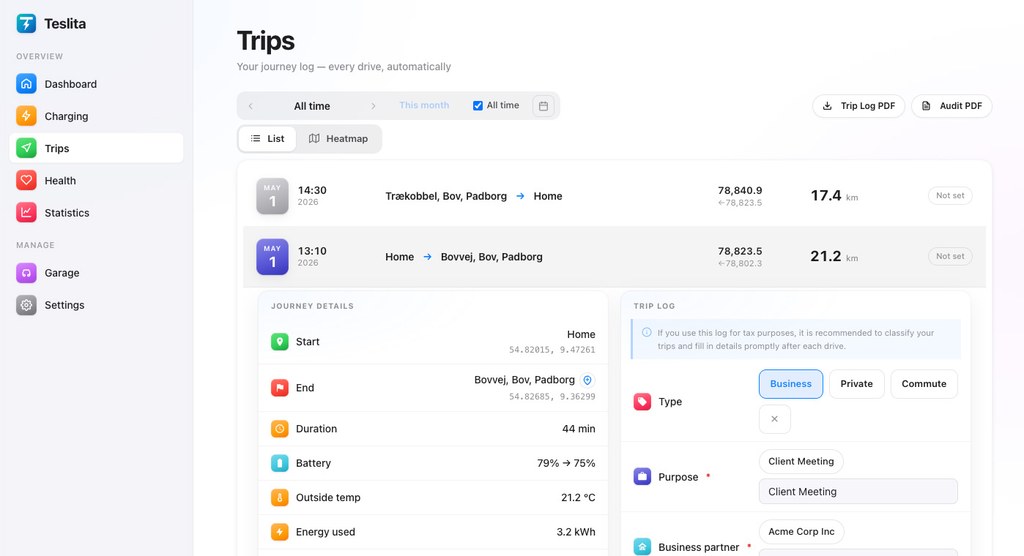
The headline feature: a signed PDF an auditor can verify
5 featuresA paper Fahrtenbuch can be doctored. A spreadsheet can be edited. A PDF from a logbook app can be reissued at any time. Teslita's monthly trip-log PDF is cryptographically signed with our ECDSA key — every page, every line. Your accountant, your HR department or a tax auditor can verify the signature in any standard PDF reader, on any computer, with no special software. If a single number is changed after export, the signature breaks and the reader shows it.
Cryptographically signed PDF Signed
Every monthly Fahrtenbuch-style export is signed with Teslita's ECDSA private key. The signature is embedded in the PDF itself, so the file is self-contained — no separate certificate to send, no online verification step, no extra software for the recipient.
Verifiable in any PDF reader
Open the file in Adobe Reader, Preview, Foxit, the macOS or Windows built-in viewer — anywhere — and the signature panel shows the document is intact and signed by Teslita. No "trust this app" prompt, no third-party validator, no service to log into.
Tamper-evident edit log
Every edit you make to a trip — changing a classification, fixing an address — is linked to the previous edit by a cryptographic hash. A modified entry breaks the chain, and the break is visible in the signed export. Reviewers can trust that what they see is exactly what was captured.
Public verification endpoint
Teslita publishes the public half of the signing key at a stable URL. Anyone receiving a signed PDF — accountant, HR, tax officer — can fetch the public key and verify the signature independently of Teslita. We could disappear tomorrow and old PDFs would still verify.
Fahrtenbuch-compliant layout
The PDF lists every trip with start time, end time, start and end address, distance, classification, and notes — the columns a German Fahrtenbuch needs. Each month is its own signed export. Works for Finanzamt submissions, employer mileage claims, and any audit that wants paper.
Every drive captured automatically
4 featuresNo app to open, no button to press Auto
Teslita captures every drive directly from the car's gear, GPS and odometer signals — the same telemetry the Tesla mobile app reads. There's no need to open anything before you drive, swipe anything when you arrive, or remember anything at the end of the week.
Start and end address filled in
Each trip arrives in your dashboard with the start address, end address, route, distance and timestamp all pre-filled, often before you've walked away from the car. You only ever need to look at a trip to classify it; everything else is already there.
Goes back to the day you connected
The moment you connect your Tesla account, Teslita starts pulling history — every drive Tesla has on file is retroactively imported. You don't have to drive for a month before you have a usable Fahrtenbuch; the archive is populated by lunchtime.
Per-car logs, no mixing
Two cars in the household, one company car and one private, a small fleet — each vehicle on your Tesla account gets its own independent log. Switch between them from the header; the PDF you export for each one only contains that vehicle's trips, with its own VIN on every page.
Business · private · commute
3 featuresOne tap per trip
Each trip can be marked as business, private or commute with a single tap from the list. The classification is what every tax authority and HR department actually cares about, and Teslita keeps the action that takes you from "raw telemetry" to "submittable log" down to a single press.
Default rules for repeat routes
Define your home, your office and your client sites once. Routes you drive over and over (home → office, office → home) get auto-classified using the rules you set, so the daily commute fills itself in and you only touch the exceptions.
Trip notes for context
Each trip carries a free-text notes field — client name, project code, anything the tax auditor or your accountant might want to see next to the line. The notes ride along to the signed PDF and the CSV export.
What's inside each trip
3 featuresRoute on a map, minute by minute
Open any trip and see the full route drawn on a map, with waypoints every minute. You can see where you stopped, where you slowed down, where you took the long way round — useful for billable-distance disputes and just for revisiting an interesting drive.
Speed and elevation plotted alongside
Below the map, speed and elevation are charted across the trip duration. Useful for understanding range loss on a mountain pass, for verifying a particular stretch of highway, or just for the curiosity value.
Stop detection
When you stop for more than a few minutes, Teslita marks it as a waypoint rather than ending the trip. Coffee stops, supermarket runs, picking someone up — they show up in the trip detail without splitting one outing into four log entries.
Live, while you're driving
2 featuresActive-trip tile on the dashboard
While you're driving, the Teslita dashboard shows a live tile with current speed, distance so far, and an ETA based on your current destination. Updates in real time over the same streaming telemetry connection — useful for a passenger checking how far there is to go.
Streams over the same telemetry channel
The live tile uses Tesla's telemetry stream — the same channel that fills in the logbook itself, so there's no separate setup or extra permission to grant. If the car is online, the tile is live.
Trust & audit
3 featuresAudit trail on every change
Every edit, every classification change, every export is logged with a timestamp. If you ever need to show how a particular trip ended up classified the way it is, the audit row is right there next to it.
Official OAuth, never your password
Teslita connects to your Tesla account via the official OAuth flow, with the minimum scopes needed to read drive history. Your Tesla password never touches Teslita. Revoke the connection from your Tesla account at any time — trips already captured stay in your archive.
Delete everything in one click
Want out? A single confirmation in Settings wipes your Teslita account and every trip from our servers, and revokes the OAuth token so Teslita disappears from your Tesla account too. No retention period, no email chain to start.
How a tax-grade driving log is built
Two minutes from signup to "my Fahrtenbuch fills itself in."
Connect your Tesla account
Sign up with email, click "Connect Tesla", approve the OAuth scopes on Tesla's own login screen. No app to install on your phone or in the car — the whole setup runs in the browser.
Drive — that's it
Each drive your car makes is captured automatically: start address, end address, route, distance, timestamp. Classify each one as business, private or commute with a single tap, or let the default rules handle your daily commute.
Download the signed PDF
At month-end, hit "Export PDF" and a cryptographically signed Fahrtenbuch-style log lands in your downloads folder. Send it to your accountant, HR or Finanzamt — they verify the signature in any PDF reader.
Why people pick Teslita for this
Single-purpose logbook apps charge a subscription to do what your Tesla already knows how to tell us — minus the cryptographic signature.
Single-purpose logbook apps
- Subscription fee per month or per year
- Often need a separate app open while driving
- PDF without a cryptographic signature
- Manual address entry / route correction
Teslita
- Free — no card on file
- Captures itself from Tesla telemetry, zero touch
- Cryptographically signed PDF, verifiable anywhere
- Plus invoices, pack health, sleep tracking and ~50 more
What it costs
Free
No card · no trial · no paywall
The driving log comes with Teslita
There's no paid tier for the driving log, and no paid tier for anything else either. Teslita is a single free product — the Fahrtenbuch is one of about sixty features in your account from day one.
- Every Tesla on your account
- Unlimited trip history
- Cryptographically signed PDF
- CSV export for accounting tools
- Tamper-evident edit log
- Audit log on every action