Will my accountant accept this?
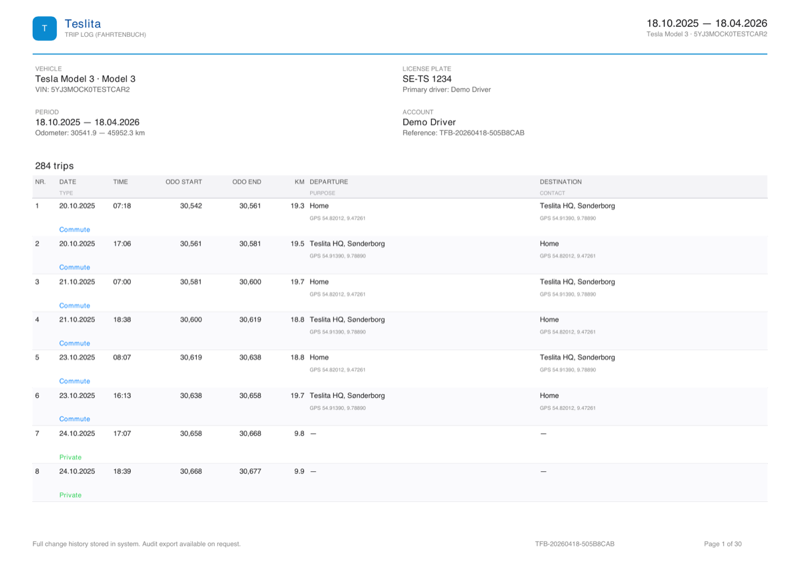
The exported PDF contains the four data points any mileage-logbook standard expects: date, start/end address, odometer, classification. Signed so your accountant can verify in any PDF reader that nothing has been altered.
Why is Teslita free?
Side project, low server costs, no paid tier, no ads, no data resale. If that ever changes, you hear about it first — and any account is fully exportable at any time.
Do I need to install anything?
No dongle, no OBD adapter, no app. Teslita uses Tesla’s official Fleet Telemetry; you approve a virtual key in the Tesla app once.
Can I export if I stop using Teslita?
Yes — full JSON bundle plus all PDF reports. No lock-in.
Is Teslita affiliated with Tesla?
No — independent service using Tesla’s official Fleet Telemetry API with your authorisation.
Will Teslita drain my Tesla’s battery or keep my car awake?
No. Teslita uses Tesla’s official Fleet Telemetry, which is push-from-car — your Tesla decides when to send, with no polling from us and no wake commands. The car batches signals whenever it’s already awake (driving, charging, climate) and stays asleep otherwise. Same mechanism Tesla service uses internally. If anything, the sleep timeline in your dashboard will help you find what is keeping your car awake — Sentry mode, cabin overheat, even the Tesla app polling.
Does Teslita drain my battery or shorten its life?
No to both. Teslita only reads telemetry your car already chose to send — no polling, no wake commands, no charge or discharge cycles initiated by us. Battery wear is driven by how you drive and charge, not by having Teslita connected. Disconnect tomorrow and your pack would degrade at the same rate.
Does Teslita know my Tesla password?
No, and we never will. The Tesla login screen during signup is Tesla’s own — you type your password directly into Tesla’s system, and Tesla hands Teslita a scoped access token instead. We store the token encrypted. Revoke it any time from your Tesla account settings.
What is the “virtual key” Tesla asks me to approve?
Tesla’s standard OAuth flow for third-party apps. You approve read-only scopes in the Tesla app once; Tesla issues Teslita a token to read your vehicle data. Revoke any time from your Tesla account, from Teslita’s Settings page, or by deleting your Teslita account — any of the three works.
What if I change my Tesla account password?
Nothing breaks. Teslita doesn’t hold your Tesla password — the connection runs on OAuth tokens that Tesla issues separately. A Tesla password change doesn’t invalidate them. To actively disconnect, revoke the token in your Tesla account settings or delete your Teslita account.
Can I add more than one Tesla?
Yes. Every Tesla on your connected Tesla account gets its own log, scoped per VIN. Trips, charging, battery health, signed reports — all separated per car. Switch between vehicles from the Garage. A family with two Teslas, or a household with a company car and a private one, sees each one cleanly on its own.
What happens if I sell my Tesla?
Teslita archives the car rather than deleting it — your trip and charging history stays readable under your account, just marked as disconnected. The new owner sees nothing of yours; they’d need to create their own Teslita account if they wanted one.
Can I edit a trip I forgot to classify?
Yes — one tap to mark a trip Business, Private or Commute. Every edit is recorded in a hash-chained audit log, so a reviewer can see exactly what changed and when. Transparency a tax auditor actually wants — not a “no changes ever” hand-wave.
How accurate are the addresses on trips and charging sessions?
Addresses come from the car’s own GPS at the moment it parks (for trips) or starts charging (for sessions), then reverse-geocoded. Sessions inside the radius you set for Home in Settings are auto-tagged Home; everything outside is auto-classified as Supercharger or other public charging.
How is home-charging cost actually calculated?
Your per-kWh rate (the one you enter in Settings) multiplied by the kWh actually delivered to the battery — not grid-side kWh, so on-board-charger and cable losses don’t inflate the reimbursement. The rate you used is printed on every signed PDF, so payroll or your accountant can see exactly how the cost was derived.
What if my electricity tariff changes mid-month?
Update the rate in Settings. Sessions before the change keep the old rate; sessions after the change use the new one. The PDF documents both periods cleanly — exactly what a tax auditor wants to see if anyone asks.
Can my Supercharger invoices be emailed to my accountant automatically?
Yes — you, your accountant and up to three other addresses, automatically as Tesla issues each invoice. You pick a preferred hour of the day; the worker fires once daily in your local time. Every email is logged with timestamp and recipient.
Can I export to a spreadsheet?
Yes — every trip and every charging session exports as CSV with the same columns as the signed PDFs. Drops straight into Excel, Google Sheets or a bookkeeping tool. The PDF for the official submission, the CSV for whoever wants to slice the numbers themselves.
Can I switch between km/miles, °C/°F, bar/PSI?
Yes — separate preferences for distance, temperature and tire pressure. Defaults are picked from your UI language and your car’s own GUI setting on first connect; override any time in Settings.
How fresh is my data?
Live telemetry signals (driving, charging, sleep state) flow within seconds of the car sending them. New Tesla-issued documents — Supercharger invoices — are pulled in automatically every ten minutes; a manual “Sync from Tesla” button is there if you want to force it immediately.
What anomalies does Teslita flag automatically?
Three things: slow Superchargers (peak kW well below the same site’s baseline), trips that used 25 % more energy than expected for their speed and temperature, and unusual phantom-drain spikes. Each flag comes with the likely explanation — a bad stall, low tire pressure, Sentry-mode hours — so you have something concrete to act on.
How do I delete my account completely?
A single confirmation in Settings (type your email to confirm) wipes your Teslita account, every trip, every charging record — and revokes the Tesla OAuth token so Teslita disappears from your Tesla account too. No retention period, no email chain. Legally-required records like paid invoices are kept for the statutory retention period; everything else goes immediately.
Is there a public API?
Yes — a REST API documented at docs.teslita.com, with example requests in curl, JavaScript, Python, PHP and Ruby. Same authentication as the web app. Read every signal your car has reported, in any language.
What’s a healthy cell-imbalance number and when should I worry?
Under 80 mV most of the time is healthy. A slow upward drift over months is normal with age; a spread that climbs week-over-week is the earliest warning sign of a weak cell-group — usually months before you’d notice as range loss. Teslita’s 90-day trend line makes the difference obvious at a glance.
What’s HV isolation resistance and why does Teslita track it?
The insulation between the high-voltage system and the chassis, measured in kΩ. A steady multi-megohm reading means the pack is sealed; a gradually falling value is a classic early sign of moisture ingress — and the kind of dated, plotted evidence a service tech actually wants when you walk in for an appointment.
What does module temperature spread tell me about my battery?
The difference between your hottest and coldest pack module at the same moment. A small spread means cooling is balancing flow well across the pack; a widening spread can indicate a blocked coolant channel or a degrading pump — caught in the data well before any warning light would trigger.
Can I see my actual Supercharger charging curve?
Yes — your last ten DC fast-charge sessions overlaid on a kW-vs-battery-% chart. Lets you see whether your taper today matches your taper last month, whether one site is consistently slower than others, and whether preconditioning made a measurable difference. The shape of the curve is the truth; the headline kW number alone never is.
Can I see my AC charging losses over time?
Yes — a median figure across all your AC sessions plus a per-session breakdown. Tells you whether your particular cable, on-board charger and installation is running closer to 88 % or 95 % efficient. Useful for answering "is my new wallbox actually any better than the granny cable?".
How much range do I actually lose in cold weather?
Teslita plots every trip’s energy consumption against the outside temperature it was driven in, with a personal trend line. Your winter range hit is shown as a specific percentage — your number, not a generic "EVs lose range when it’s cold" estimate. Same explicit treatment for the highway-speed penalty.
Does Teslita track regenerative-braking recovery?
Yes — the share of drive energy your car has recovered via regen over its lifetime, as a ratio plus the underlying kWh figures. The clearest answer to "how much of my range actually comes from braking?".
Can I see which Tesla firmware versions my car has run?
Yes — every firmware version your car has reported, with the exact dates it was running each one. Makes release-date proof easy and lets you line up efficiency or sleep changes with specific updates.
Did the last firmware update change my efficiency or sleep behaviour?
Yes — Teslita compares efficiency, sleep and drain before and after each update. Needs at least a week of data on each side; once populated, it shows whether Tesla’s last firmware actually changed anything measurable on your car — not on a fleet average.
Does Teslita warn me about slow tire leaks before the TPMS light?
Yes — a 14-day sliding slope analysis per wheel. If one wheel loses air faster than the others, Teslita flags it as a suspected slow leak before the dashboard TPMS warning would trigger. Catching a puncture at the slow-leak stage usually saves the tire.
Can I see seasonal tire-pressure trends?
Yes — one line per wheel across the last three months. A cold snap dropping all four pressures together is normal weather; a single wheel slowly losing air is a leak. Teslita lays them on the same chart so you can tell which is which at a glance.
What counts as "normal" phantom drain on a Tesla?
Typically a few percent over a 24-hour parked period. Sharp overnight spikes (5 % or more) usually mean Sentry mode, cabin overheat protection, or a failed sleep — not pack degradation. Teslita’s timeline shows you which it was for each specific night, so you can stop guessing.
What does it mean when my Tesla isn’t sleeping at all?
Entire nights of "online idle" (the car awake but doing nothing) usually mean a background service got stuck. Teslita flags the pattern so you can try a two-button reset (or wait for the next firmware) instead of blaming the pack — which is almost never the actual cause.
Can I see where my Tesla is right now in Teslita?
Yes — the live dashboard shows where the car is, what it’s doing (parked, driving, charging) and the current battery level. Updates in real time over the telemetry stream, without you having to refresh.
Does Teslita track my Autopilot and FSD mileage?
Yes — cumulative distance driven with Autopilot or FSD engaged. Picks up from the car’s own counter, so it reflects your lifetime usage rather than just what you drove after connecting Teslita.
How much capacity has my Tesla battery actually lost since new?
Teslita shows you the number. Current usable capacity from the BMS divided by a factory-new baseline derived from your VIN, then refined against the highest capacity your specific car’s BMS has ever reported. The result is a single percentage — typically displayed alongside the underlying kWh so you see both "92.3 % of new" and the actual kWh that produces.
Is my battery degrading faster or slower than average for my mileage?
Teslita knows the expected degradation curve for Tesla packs at any odometer — most loss happens early, then it plateaus. Your actual capacity is overlaid against that expected curve, so you see at a glance whether you’re tracking the fleet, ahead of it, or behind it. A concrete answer to "am I unlucky or just normal?".
How does Teslita actually measure battery health?
Two layers. First, capacity — current usable kWh from the BMS divided by an as-new baseline. Second, condition — the underlying BMS signals (cell-imbalance mV, HV isolation kΩ, module-temperature spread, fault counts) trended over 90 days. A pack can be at 95 % capacity but have a single weak cell; a pack at 88 % can be perfectly balanced. Both numbers matter, and Teslita shows both.
What’s a normal degradation rate for a Tesla?
Most packs lose around 7 % capacity over their first 100,000 km (about 60,000 miles), then much less over each subsequent 100,000. Teslita overlays your actual capacity on this expected curve, so you see whether your pack is normal, ahead of it, or worth investigating — without having to do the maths yourself.
Can I see how many charge cycles my Tesla has done?
Yes — lifetime charge cycles, total kWh charged, total kWh used, and a charging-mix breakdown (Supercharger vs home vs other public). One screen, no calculator needed.
Can I track my charging mix — Supercharger vs home — over time?
Yes — the share of your lifetime kWh that came from each source, broken down per car. Useful for "am I using Superchargers more than I think?" and for the long-running question of whether DC fast charging is affecting your pack.
Will Teslita tell me if I’m still within Tesla’s battery warranty?
Yes — your current capacity vs as-new is tracked, so you can see exactly where you sit relative to Tesla’s typical 70 % / 8-year warranty floor. Combined with the 90-day fault count and dated trend lines, you have the evidence package a warranty claim actually needs — instead of a "feels worse than it used to" conversation that gets dismissed.
Why does my battery percentage sometimes jump unexpectedly?
BMS recalibration. The battery management system reassesses usable capacity periodically — typically after a deep discharge or a full charge — and the displayed % can jump a few points. It’s normal, and the right behaviour. Teslita’s capacity readings track those recalibrations too, so a jump on your dashboard usually has a matching jump in the underlying kWh figure.
Can I see what my battery looked like 6 months ago?
The cell-imbalance, isolation and module-temperature trends go back 90 days as charts. Capacity readings go back as far as you’ve been on Teslita, with dated points so you can reconstruct your degradation curve as a timeline. Older data exports as CSV if you want to plot it yourself.




 Teslita