 Teslita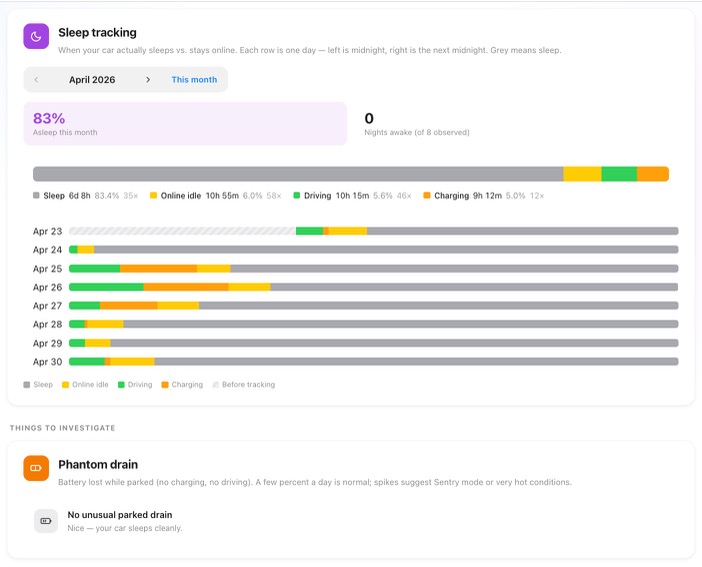
The headline feature: a 30-day sleep timeline
4 featuresOne row per day, midnight to midnight, coloured by what your car was doing — grey for asleep, yellow for online idle, green for driving, orange for charging. The pattern tells you everything: a row that's mostly grey is a car that slept; a row with yellow stripes at 2 AM is a car burning kWh for no good reason. The most common cause of "my range is dropping" isn't pack degradation. It's right here, on this chart.
Day-by-day, hour by hour
A single 30-day grid — 30 horizontal rows, one per day, each running left-to-right from midnight to midnight. Every minute the car spent sleeping, idling online, driving or charging is coloured in. You see the shape of your car's month in one glance.
Monthly sleep share, one number
A single percentage at the top: how much of the tracked time the car actually slept versus stayed online. A healthy Tesla sits well above 80 %; lower numbers point at something keeping it awake. The number updates daily as the month fills in.
"Nights awake" counter
Counts how many of the last N observed nights your car never went to sleep at all. Zero is the goal. Anything else is worth a click into the day-detail to find out what kept it up.
State breakdown across the month
Above the timeline, a single stacked bar shows total hours of sleep vs idle vs drive vs charge for the month, with per-state hour counts and wake-event counts. Lets you compare months at a glance — "is this winter's drain pattern actually worse than last winter's?".
Phantom drain, charted and explained
3 featuresBattery lost while parked
Any overnight battery loss while the car is parked — no driving, no charging — is tracked and charted. A few percent a day is normal; sharp spikes call out the bad nights. This is the chart that answers "did I really lose 12 % overnight or am I imagining it?".
Spike detection with explanation Diagnostic
When phantom drain crosses a healthy threshold, Teslita flags the day and lists the plausible explanations — Sentry mode hours, cabin overheat protection, climate preconditioning, or a flat-out failed sleep. The fix is usually a single setting change.
"No unusual drain" status
When your car is sleeping cleanly, the Phantom-drain card just says "No unusual parked drain — nice, your car sleeps cleanly." Most months for most cars, that's exactly what you want to see. Saves you from staring at a chart full of nothing.
What's actually keeping the car awake
4 featuresSentry-mode hours
Teslita counts the hours the car spent in Sentry mode each night. Sentry is the single biggest battery drain on Tesla — leaving it on at home overnight can cost 5–10 % a day. If you see Sentry running every night, that's your answer in one number.
Cabin overheat protection
When the car turns on the AC because the cabin got too hot — typical for cars parked in the sun — Teslita logs it as an "online idle" segment in the timeline. Hot summer afternoons that turn into chunks of yellow on the timeline are usually this.
Preconditioning & climate
Scheduled departures, climate-on-via-app, and HVAC preconditioning all count toward online-idle hours. Teslita doesn't hide them — if you're seeing 30 minutes of green every morning at 7 AM, it's probably the climate kicking in before your commute.
Failed sleep
Sometimes the car just won't sleep — typically because some background service got stuck. You'll see entire nights of yellow with no obvious reason. Teslita flags this pattern so you can try a 2-button reset (or wait for the next firmware) instead of blaming the pack.
Tap any day for the minute-by-minute
3 featuresDay-detail modal
Click any row in the timeline and you get every transition the car made that day: woke at 06:54, drove 18 minutes, parked at 07:23, slept at 08:11, woke at 14:02 for Sentry, slept at 14:34. Every event timestamped, with charging and driving rows linked to the full session or trip.
Wake-event counts
Each daily row shows how many times the car woke up. A high wake count with low idle time means the car keeps getting nudged awake but does manage to sleep again — usually background polls or app checks. Worth knowing what's waking it.
Before-tracking shading
On days before you connected your Tesla account, the timeline is striped grey so you don't mistake "we have no data" for "the car was asleep". An honest gap is more useful than a flattering one.
Settle the "is my battery dying?" question
3 featuresPhantom drain vs real degradation
Most "the range is dropping" worries are phantom drain, not pack degradation. Pack degradation is gradual (a few percent over months); phantom drain shows up as 5–15 % overnight losses on specific days. The shape of the loss tells you which one you're looking at — and Teslita's timeline shows that shape directly.
Compare months in one view
The monthly sleep-share number lets you compare last March to this March. If both are 87 % asleep, your usage pattern is the same and any range difference is something else. If this March is 60 %, you found your "missing range".
Bring evidence to a service visit
If you do want Tesla to look at the pack, the timeline plus the phantom-drain chart is the kind of evidence that gets past "we couldn't reproduce it." You walk in with "the car was awake 11 of 14 nights last month, here's the chart" instead of "it feels off."
Trust & audit
3 featuresStreams from the official Tesla telemetry
Every state transition on the timeline comes from Tesla's own telemetry stream — the same channel Tesla's mobile app reads. Nothing inferred from charge levels, nothing made up. If the car was asleep, we know because the car said so.
Official OAuth, never your password
Teslita connects to your Tesla account via the official OAuth flow, with the minimum scopes needed to read vehicle state. Your Tesla password never touches Teslita. Revoke the connection from your Tesla account at any time — data already collected stays in your archive.
Delete everything in one click
Want out? A single confirmation in Settings wipes your Teslita account and every recorded state from our servers, and revokes the OAuth token so Teslita disappears from your Tesla account too. No retention period, no email chain to start.
How to read your car's sleep pattern
Two minutes to connect — a usable timeline in three nights, a full picture in a month.
Connect your Tesla account
Sign up with email, click "Connect Tesla", approve the OAuth scopes on Tesla's own login screen. No app to install on your phone or in the car — the whole setup runs in the browser.
Telemetry starts within minutes
Teslita begins recording state transitions immediately. By the next morning you have your first complete night on the timeline; by the end of the week you can already see a pattern; by the end of the month you have a full picture.
Spot the answer in the colours
Mostly grey rows mean the car is sleeping cleanly — nothing to do. Yellow stripes at the same time every night usually mean Sentry; chunks of yellow on hot afternoons usually mean cabin overheat; entire yellow nights mean the car isn't sleeping at all. Each pattern has a one-setting fix.
Why people pick Teslita for this
The paid Tesla tools that include sleep tracking bury it inside a much bigger dashboard and charge for the whole bundle. We surface it directly, focus on the diagnostic angle, and keep it free.
Paid all-in-one Tesla trackers
- Monthly subscription, sleep is one of many tabs
- Heavy dashboards with steep learning curve
- No explicit "what's keeping the car awake" diagnostic
- Often paid in USD with EU/UK billing friction
Teslita
- Free — no card on file
- 30-day timeline + monthly sleep share + drain chart
- Explicit Sentry, climate and failed-sleep call-outs
- Plus invoices, driving log, battery diagnostics and ~50 more
What it costs
Free
No card · no trial · no paywall
Sleep tracking comes with Teslita
There's no paid tier for sleep tracking, and no paid tier for anything else either. Teslita is a single free product — phantom-drain diagnostics are one of about sixty features in your account from day one.
- Every Tesla on your account
- 30-day sleep timeline
- Monthly sleep share %
- Phantom-drain chart with spike detection
- Day-detail modal with every wake event
- Sentry / climate / failed-sleep callouts