 Teslita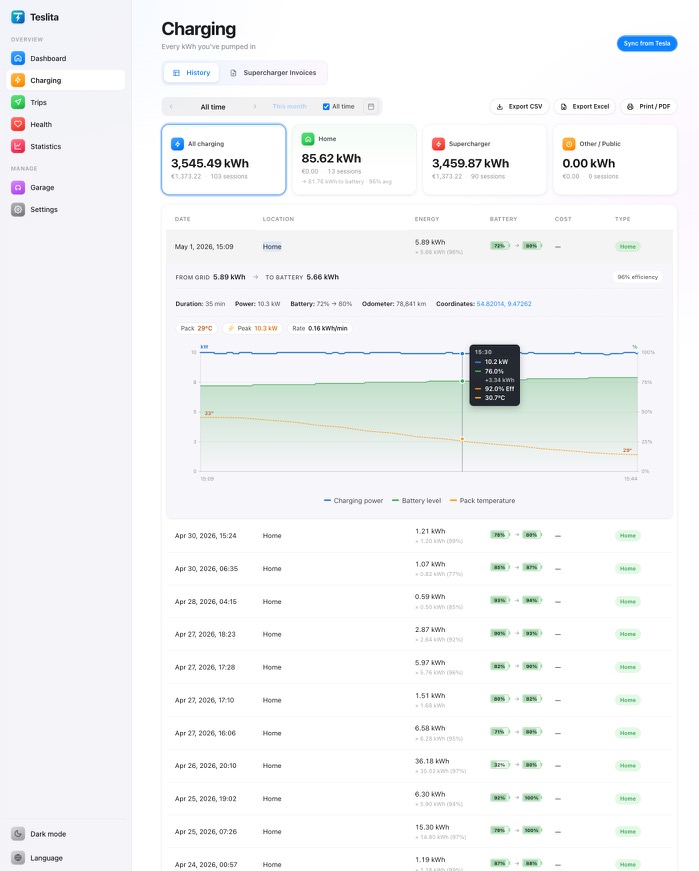
The headline feature: a signed PDF the tax office accepts
5 featuresA spreadsheet of home-charging sessions is easy to put together and easy to wave away — there's no way for the recipient to verify the numbers weren't typed in after the fact. Teslita's monthly home-charging statement is cryptographically signed with our ECDSA key, every page, every line. Your employer's payroll team, your accountant or a tax auditor can verify the signature in any standard PDF reader, on any computer, with no special software. If a single kWh or rate is changed after export, the signature breaks and the reader shows it.
Cryptographically signed PDF Signed
Every monthly home-charging statement is signed with Teslita's ECDSA private key. The signature is embedded in the PDF itself, so the file is self-contained — no separate certificate to send, no online verification step, no extra software for the recipient.
Verifiable in any PDF reader
Open the file in Adobe Reader, Preview, Foxit, the macOS or Windows built-in viewer — anywhere — and the signature panel shows the document is intact and signed by Teslita. No "trust this app" prompt, no third-party validator, no service to log into.
Per-session breakdown
The PDF lists every home session with date, start time, kWh added to the battery, your per-kWh rate, and the computed cost for that session. Plus a monthly total and the number of sessions. The columns a payroll team or tax officer actually wants to see.
Rate provenance on the document
The rate you used is printed on the PDF itself, so the recipient knows what number was applied and how the cost was computed. If you change your rate part-way through a month (utility tariff change), the PDF shows both periods with the rate that applied during each.
Public verification endpoint
Teslita publishes the public half of the signing key at a stable URL. Anyone receiving a signed PDF — payroll, accountant, tax officer — can fetch the public key and verify the signature independently of Teslita. We could disappear tomorrow and old statements would still verify.
Every home session captured automatically
4 featuresNo app to open, no button to press Auto
Teslita captures every charging session directly from your Tesla's telemetry — the same data the Tesla mobile app reads. You don't need to remember to start a timer, scan a code or log in to anything. Plug in, charge, walk away — the session is on your account before you're back at the door.
"Home" classified automatically Auto
Set your home address once in Settings (search by address, use your phone's GPS, or pull from the car's last parked location). From then on, every charging session inside the radius you chose is automatically tagged as Home. The Charging page filters to Home with one click — that's your reimbursement view.
kWh added to the battery
Teslita records both the grid-side kWh and the kWh actually added to the battery, so you can see the AC charging loss as well. The PDF uses the actual kWh delivered to the pack, which is what your employer typically wants for reimbursement — the cost you incurred net of cable and on-board-charger losses.
Per-car logs for multi-vehicle households
Two Teslas in the household, one company and one private? Teslita scopes everything per vehicle, with its own VIN on each PDF. Export only the company car's home-charging statement and your employer never sees the private trips — and vice versa.
Why the actual-cost route wins over the flat rate
4 featuresBeat the flat-rate Pauschale
In most European countries an employer can pay a flat monthly Pauschale (Germany: ~€30 / month for a car-park charger, ~€70 without). If you charge at home daily, your actual cost is almost always higher. Documenting it with Teslita typically moves you €300–€1,500 a year ahead of the flat rate — for filing a single PDF a month.
Variable electricity rate, no problem
Utility bumped your tariff in March? Update your per-kWh rate in Teslita. Sessions before the change keep their original rate; sessions after use the new one. The PDF documents both periods cleanly, which is exactly what an auditor wants to see if anyone asks.
CSV export for the accountant
Some accountants prefer a spreadsheet over a PDF. Teslita exports the same data as CSV — date, location, kWh, rate, cost — so it drops straight into a bookkeeping tool or annual tax software. Use the PDF for the official submission, the CSV for the accountant's own records.
Annual ZIP for end-of-year
At year-end, grab all twelve monthly PDFs as a single ZIP archive. The annual filing is one upload, one timestamp, one batch — not twelve separate downloads. Useful in DE/AT where year-end Lohnsteuer or Steuererklärung often includes the full year's electricity proof.
Rate setup, once. Then it runs.
3 featuresPer-kWh price in Settings
Enter your actual electricity price once (€0.32/kWh, $0.18/kWh, whatever your bill says). Teslita applies it to every home session going forward, and to the historical sessions retroactively. The number is clearly labelled as estimated everywhere it appears — Tesla doesn't report a cost for home sessions itself.
Multi-currency support
Rate in EUR, USD, GBP, NOK, SEK, DKK and others. The PDF and CSV are produced in your preferred currency. Useful if you split time between countries or charge while travelling on a different tariff.
Monthly cost chart at a glance
Above the charging history, a bar chart shows your monthly home-charging cost across the year. Lets you spot the months where reimbursement should be highest, and quickly verify a payroll cycle by eye before submitting.
Trust & audit
3 featuresStreams from the official Tesla telemetry
Every kWh on the home-charging statement comes from Tesla's own telemetry stream — the same channel the Tesla mobile app reads. Nothing extrapolated, nothing made up, nothing scraped. If Tesla reports it, Teslita shows it, signs it, and exports it.
Official OAuth, never your password
Teslita connects to your Tesla account via the official OAuth flow, with the minimum scopes needed to read charging history. Your Tesla password never touches Teslita. Revoke the connection from your Tesla account at any time — statements already exported keep their signatures valid.
Delete everything in one click
Want out? A single confirmation in Settings wipes your Teslita account and every session record from our servers, and revokes the OAuth token so Teslita disappears from your Tesla account too. No retention period, no email chain to start.
How to claim home-charging cost in full
Two minutes to set up. A signed PDF every month afterwards.
Connect Tesla + set your rate
Sign up with email, click "Connect Tesla", approve the OAuth scopes on Tesla's own login screen. Then go to Settings → Home and enter your per-kWh electricity price. That's the whole setup — about two minutes.
Charge at home as usual
Plug in whenever you normally do. Teslita captures every session automatically, classifies it as Home if it's within your home radius, and tracks the kWh added to the battery. Your monthly total starts populating from session one.
Export the signed PDF each month
At month-end, hit "Print / PDF" on the Charging page filtered to Home. A cryptographically signed statement lands in your downloads folder. Send it to payroll, your accountant, or the tax office — they verify the signature in any PDF reader.
Why people pick Teslita for this
Most ways of documenting home-charging cost are either painful (manual spreadsheets) or unverifiable (a printout the auditor can't check). The signed PDF is what makes Teslita land here.
Manual / generic approaches
- Spreadsheet of kWh + rate, typed by hand
- Wallbox-app print-outs (no Tesla-side kWh)
- PDF an auditor can't cryptographically verify
- Monthly admin chore, easy to forget
Teslita
- Free — no card on file
- Captures from Tesla telemetry, kWh-to-battery
- Cryptographically signed PDF, verifiable anywhere
- Plus invoices, driving log, battery diagnostics and ~50 more
What it costs
Free
No card · no trial · no paywall
Home charging statements come with Teslita
There's no paid tier for home-charging statements, and no paid tier for anything else either. Teslita is a single free product — the signed home-charging PDF is one of about sixty features in your account from day one.
- Every Tesla on your account
- Signed monthly PDF in your currency
- CSV export for the accountant
- Annual ZIP bundle for year-end
- Variable rate periods supported
- Public verification endpoint